


 Auteur vérifié
You have 30 people, maybe 50. Your business is booming, you’ve got one project after another, and you’re recruiting regularly. And yet, you spend your evenings on Excel, trying to figure out if your projects are profitable. Your team juggles seven different tools that don’t talk to each other. And that famous “consolidated vision” that everyone is clamoring for? It only exists in your dreams.
You’re thinking it’s time to move on to a real ERP. And you’re right.
But here’s the problem: between 55% and 75% of ERP projects fail. And when we say “fail”, we’re not talking about a simple delay. We’re talking about budget overruns of 189% on average, projects abandoned after months of effort, firms that end up reverting to their old processes because the new tool was worse than the old one.
The cost of a bad choice? Hundreds of thousands of euros up in smoke. De-motivated teams. Stalled growth. And that depressing feeling of having invested a fortune in a tool that cripples you instead of helping you.
The good news? These failures are not inevitable. They are the direct result of poor selection criteria. Firms that choose on the basis of commercial demos rather than their real operational needs. Who underestimate the complexity of implementation. Who forget that their teams will have to live with this tool for eight hours a day.
Here are the 10 criteria that separate an ERP that transforms your practice from one that ruins it. In order. Without compromise.

You’re not a widget manufacturer. You don’t manage product inventories. Your business is human time, sold by the hour or on a fixed-price basis. It’s projects that last three weeks or eighteen months. It’s consulting, expertise and support.
And yet, 80% of ERPs on the market were designed for manufacturing or trading industries. The result? They’re great for managing your cash flow and accounting, but completely out of touch with everything that makes your business unique.
An ERP designed for consulting firms must natively manage :
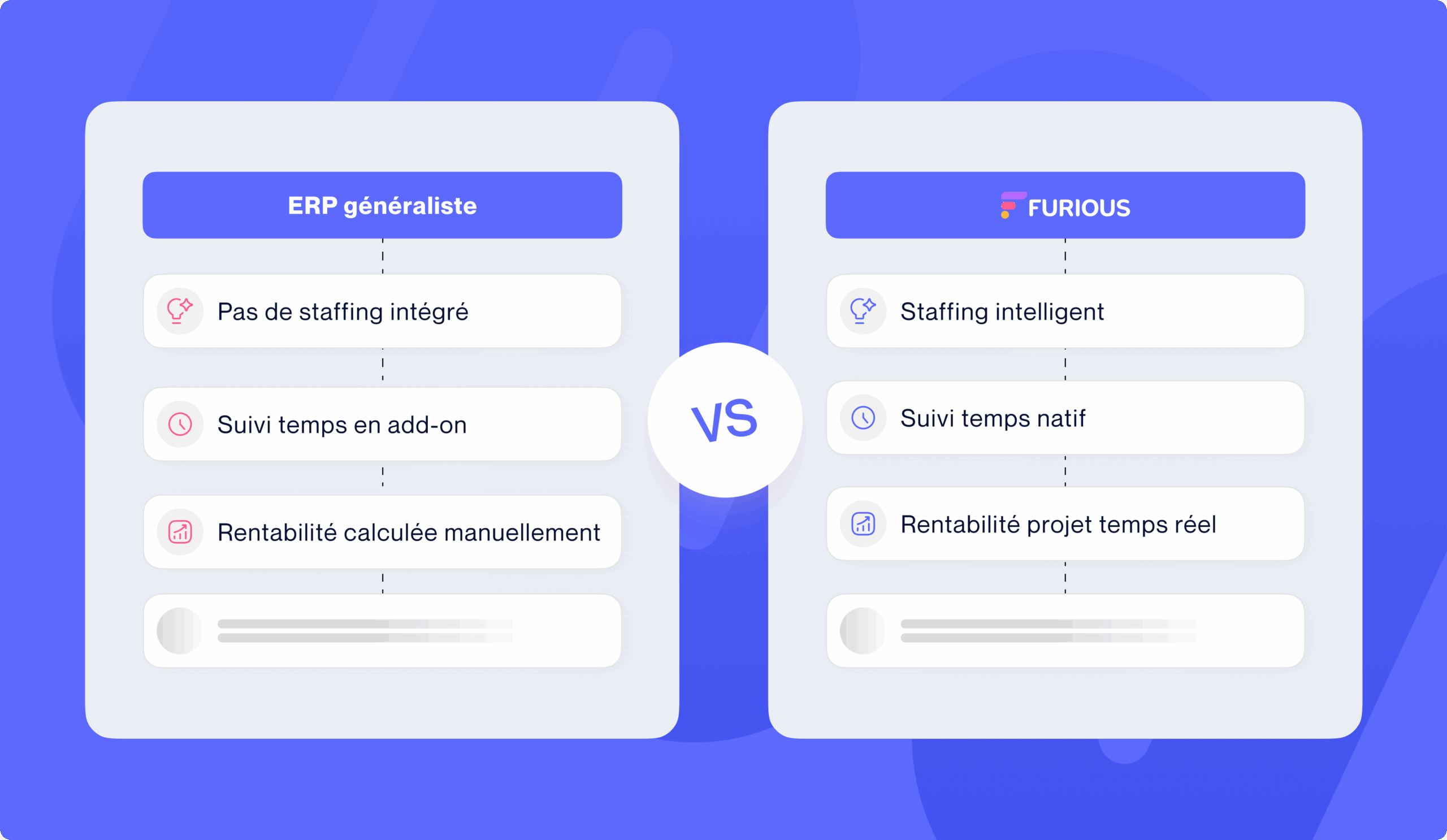
Time tracking: your consultants need to be able to effortlessly enter their past and planned time. Future time automatically becomes past time once the date has passed. No double entry. No friction.
Project profitability in real time: Not in two months’ time when your accountant has closed the books. Now. With the ability to instantly see if a project is drifting off course and correct it before it’s too late.
Intelligent staffing: Who’s available? Who has the required skills? Who’s already overloaded? The tool should give you these answers in just a few clicks, not after three hours of cross-checking your schedule with your Excel spreadsheets.
Pre-sales management: Because you spend 20% to 30% of your time pitching without getting paid. This investment needs to be tracked, measured and arbitrated. Otherwise, you’re losing money without even knowing it.
Beware of “general ERP + service module” solutions. In 90% of cases, the services module is an add-on to software designed for something else. It will always be missing functionalities that are critical to your business.
Implementation costs generally represent between 100% and 200% of the annual cost of the software. In other words, if you’re paying €50K a year for a license, you’ll need to budget an extra €50-100K just to get it up and running. And that’s when everything’s going right.
Only 27% of ERP projects are delivered on time. Three-quarters slip. And in the meantime? Your firm is in project mode. Your teams are spending 25% to 50% of their time on implementation instead of invoicing customers. Your growth is on hold.
Ask the seller:
Average implementation time for a firm of your size: If you hear “three to six months”, dig deeper. Ask for customer references with actual lead times. If it’s consistently longer, it’s a bad sign.
Integration methodology: Is it a big bang, where everything happens at once? Or a modular approach where you can roll out gradually? The second option is infinitely less risky.
Level of customization required: The more custom development required, the longer, more expensive and more risky it is. A good ERP for firms should be configurable, but not require custom code to operate.
Support included: How many days of training? Setup time? Start-up support? If everything is optional, multiply the budget by two.
Commercial demonstrations always show you the final version, perfectly parameterized, with impeccable demo data. What they never show? The six months of hard work it took to get there. Insist on talking to a customer who has just completed his implementation, not one who has been using the tool for five years.
95% of companies that fail with their ERP project spend less than 10% of their budget on training. But here’s the paradox: if your tool requires three weeks of training to be usable, it’s the tool that has a problem, not your teams.
Your consultants are experts in their field. Not system administrators. If they have to go through fifteen screens and thirty clicks to enter an expense report, they won’t do it. They’ll bypass the tool, and you’ll end up with rotten data.
Test the real interface: Not the commercial demo. Ask for test access. Give it to your teams. Ask them to perform three common tasks: enter time, create a quote, check the profitability of a project. If it takes more than two minutes per task, it’s too complicated.
Check onboarding: How does a new employee learn to use the tool? Are there built-in tutorials? A context-sensitive help system? Or do they have to read 150 pages of documentation?
Look at customer adoption rates: Ask the salesperson, “What percentage of your customers are actually using all the features six months after deployment?” If he dodges the question, it’s because he knows the answer is depressing.
Ultra-powerful all-in-one ERPs that do absolutely everything… but require a PhD to use. You don’t want an Airbus cockpit. You want a Tesla dashboard: powerful but intuitive.
The promise of ERP is a single data source. No more information scattered across fifteen tools. No more Excel exports and manual cross-checking. No more “wait, I’m not on the right version of the file”.
The reality? In many ERP systems, the modules are so compartmentalized that you wonder if they were developed by the same team. Your CRM talks to your invoicing, which talks to your accounting, which talks to your planning… but nothing really synchronizes. You end up with as many silos as before, just in a single tool.
The complete project path: Ask the sales representative to show you the life of a project from A to Z. From CRM opportunity to quotation, from quotation to project, from project to invoicing, from invoicing to customer settlement, from settlement to final profitability calculation. Everything must run smoothly. No re-keying. No export/import between modules.
Data consistency: If you modify a project’s budget, is this modification automatically reflected in the steering, alerts and dashboards? Or do you have to manually “refresh” several screens?
Business workflows: Does a signed quotation automatically become a project, with the invoicing plan taken over? Or do you have to recreate everything manually? Does planned time automatically switch to time spent once the date has expired?
DIY solutions with modules purchased separately. You’ll have a CRM from publisher A, an accounting module from publisher B, a planning module from publisher C, all “integrated” via connectors that crash every three months.
Your firm closed its financial year two months ago. Your accountant has finally sent you the balance sheet. Congratulations: you discover that three of your major projects were loss-making. Too late to correct. Too late to bill riders. Too late to adjust staffing. You’ve just lost money.
That’s old-fashioned driving. You drive by looking in the rear-view mirror.
Real-time dashboards: Your key indicators (sales, profitability per project, occupancy rate, cash flow) need to update automatically. Not tomorrow. Not in an hour. Now.
Information granularity: You need to be able to zoom from global to detailed in two clicks. Consolidated view of the firm → profitability by business unit → profitability by customer → profitability by project → variance details.
Automatic alerts: ERP should warn you when a project exceeds its budget. When a customer delays payment. When a consultant is chronically under-occupied. You can’t monitor 50 projects simultaneously. The tool has to do it for you.
The projected landing: Based on your current activity and pipeline, where will you end the year? This projection must be constantly recalculated as your projects evolve.
ERPs that sell you “business intelligence” but whose dashboards are updated once a night via batch. In 2025, this is unacceptable.
Today, there are 35 of you. In three years, you’re aiming for 80. In between? You’ll be recruiting, perhaps opening a branch, launching new offers, perhaps going international.
If your ERP can’t keep up with this growth, you’re going to change it in two years’ time. And start the whole circus all over again: new selection, new implementation, new processes, new training. Your teams will love it.
Technical scalability: How many users can the tool support without slowing down? What is the volume of projects, transactions and data? Ask to speak to a customer who has doubled or tripled in size with the same ERP.
Multi-entity management: If tomorrow you create a subsidiary, an international structure, or organize yourself into business units, can the tool handle this complexity? With a consolidated view AND autonomy for each entity?
Functional scalability: Can you activate new modules over time without breaking the bank? Or do you have to start from scratch every time you upgrade?
Pricing model: How does the price evolve as you grow? Per user? By sales volume? Per entity? Beware of systems where your bill doubles when you go from 40 to 50 people.
Solutions that are “perfect for 30-50 people” but become unusable beyond that. Or worse: those that require you to migrate to a totally different “enterprise” version when you exceed a certain threshold.
We weren’t looking for a sprawling ERP, but a clear, actionable tool designed for our reality. Furious ticked all the boxes.
Véronique Gervais, Digital Expert, O2M
You already have a CRM that you love. An accounting tool that your CFO masters perfectly. An HR solution that works well. The idea of replacing everything makes you anxious, and you’re right.
A good ERP doesn’t have to replace everything. It connects with your existing tools when they do their job very well.
Native integrations: How many? With which tools (accounting, banking, CRM, HR tools, etc.)? Are they bidirectional or just one-way? Are they updated in real time, or by occasional synchronization?
The API: If native integration doesn’t exist, can you build it yourself or via an integrator? Is the API documented, stable and complete?
iPaaS connectors: Is the tool compatible with Zapier, Make, or other automation platforms that allow you to connect hundreds of applications without coding?
Export capability: Can you extract your data easily? In what formats? With what granularity? (A crucial question for the day when you might want to switch ERP systems).
ERP “closed gardens” that want to do absolutely everything in-house and systematically refuse any external integration. You’ll end up locked into a rigid ecosystem.
You’re in the middle of a monthly closing. Your billing module crashes. You open a support ticket. Automatic response: “We have received your request. A consultant will get back to you within 5 working days.”
Meanwhile, you can’t bill. Your customers are waiting for their invoices. Your cash flow is blocked. And support suggests an appointment for next week.
80% of customers are dissatisfied with their ERP. And in the majority of cases, it’s not the tool that’s at fault. It’s the support.
Actual SLAs: What is the first response time? Resolution time? Is there telephone or ticket support? Is there a hotline for critical emergencies?
Support hours: If you work until 7pm and support closes at 5pm, you’ve got a problem. If you have international teams, is support available in several time zones?
Support quality: Talk to current customers. Ask them, “When you have a blocking problem, how long does it take to get unblocked?” The answers are often very different from the sales pitch.
Self-support resources: documentation, video tutorials, knowledge base, user community. The richer these resources are, the less you depend on support.
Publishers who have outsourced their support to a low-cost country with teams who don’t really know the product. You spend your time explaining the problem to someone reading a script.
Your ERP is running smoothly. You’ve set up your workflows. Trained your teams. Everything’s running smoothly. And then the publisher releases a major update. You install it. Half your settings are gone. Three features you used every day have disappeared. And your integration with your accounting tool no longer works.
Welcome to the hell of disruptive updates.
The update model: Are they automatic and mandatory (SaaS)? Or do you retain control over the schedule (on-premise)? How often? Monthly? Quarterly? Yearly?
Backward compatibility: do updates respect your existing settings and customizations? Or do you have to re-validate everything after each update?
Transparency: Does the publisher communicate clearly what changes in each version? Are there detailed release notes? A test environment to validate the update before deploying it in production?
Transition support: If an update breaks something, will the publisher help you fix it? Or is it up to you?
Ultra-aggressive SaaS solutions that push out updates every two weeks, with no validation possible on your side. You’re constantly chasing changes.
The sales rep tells you: “Our solution costs €50 per user per month.” You calculate: 35 people × €50 × 12 months = €21,000 per year. That’s easy.
Six months later, the actual bill is €85,000. How come? Because there were the “optional but essential” modules. Implementation costs. Training days. Connectors with your other tools. Premium support. Storage volume. And three other lines you’ve never heard of.
The full cost for the first year: License + implementation + training + configuration + integrations + support. All-inclusive. Ask for a detailed costing, line by line.
Annual running costs: Once in place, how much does the tool cost each year? Beware of models where the invoice automatically increases by 5% a year, or which index the price to your sales.
Hidden costs: Are there any fees for adding new users? To activate new modules? To migrate your data? To access APIs? To export your data?
Exit conditions: What happens if you want to change ERP in three years’ time? Can you cancel easily? Recover all your data? Are there any penalties?
Freemium” models, where basic functions are free but you discover that everything that’s really useful has to be paid for. Or multi-year contracts that lock you in for five years, with astronomical penalties for early termination.
The choice that changes everything
As you can see, choosing an ERP isn’t just about choosing software. It’s about choosing how your practice will operate for the next five years. It’s about choosing whether your teams will save time or lose it. If you’re going to use instruments or a wet finger. Whether your growth will be accelerated or slowed.
The statistics are stubborn: between 55% and 75% of ERP projects fail. But these failures are not inevitable. They’re the result of poor choices, based on the wrong criteria, made too quickly, without really understanding what’s at stake.
The firms that succeed in their transformation? They’re the ones who take the time to ask the right questions. Who actually test the tools, rather than just giving nice demos. Who talk to existing customers rather than sales reps. Who evaluate on business criteria rather than marketing promises.
Your ERP must understand your consulting business. Be quick to implement. Be intuitive. Circulate data. Manage in real time. Grow with you. Integrate with your ecosystem. Truly support you. Evolve without breakage. And have transparent pricing.
These ten criteria are non-negotiable. Not optional. Not “nice to have”. They are the foundations of a successful ERP project.
Now it’s up to you. Because the worst ERP is not the one you choose. It’s the one you won’t choose, because you’ll be stuck with your current tools, which are holding you back.
So, where do you start?
Expect to pay between €40K and €150K in the first year (license + implementation + training), then €20K to €60K per year in run costs. Rule of thumb: implementation costs generally represent 100% to 200% of the annual cost of the license. Beware of hidden costs (“optional” modules, connectors, premium support), which can double the initial bill.
For a firm of 30-50 people, aim for 3 to 6 months, with a gradual approach. Be wary of promises of deployment in 6 weeks: only 27% of ERP projects are delivered on time. A good indicator: if the vendor promises less than 3 months, ask for proof with verifiable customer references.
For a consulting firm, the Cloud (SaaS) is generally more suitable: lower initial costs, automatic updates, easier remote access. On-premise can only be justified if you have specific regulatory constraints or a strong in-house IT team. Cloud bonus: you can get started quickly and scale without infrastructure investment.
Follow these 4 golden rules: (1) Involve your teams right from the selection stage, not afterwards, (2) Dedicate at least 10% of your budget to training, (3) Deploy gradually rather than in a big bang, (4) Really test the tool before signing, not just during the sales demo. And above all: talk to 3-4 of the publisher’s current customers who have your profile.
Focus on intelligent integration. Keep the tools that work very well (your beloved CRM, your efficient HR solution) and make sure the ERP can connect to them natively. A good firm ERP should offer at least 20-30 native integrations, and an open API for the rest. The goal: to eliminate data silos, not necessarily all your tools.
Focus on intelligent integration. Keep the tools that work very well (your beloved CRM, your efficient HR solution) and make sure the ERP can connect to them natively. A good practice ERP should offer at least 20-30 native integrations, and an open API for the rest. The aim: to eliminate data silos, not necessarily all your tools.