
7 tools in your stack? Here’s what it’s costing you
You’ve carefully selected the best CRM on the market. Added the project management tool everyone recommends. Opted for the top-rated time tracking solution. And rounded it out with an invoicing tool, a collaboration platform, reporting software, and, of course, a few handy spreadsheets for specific cases.
In short, you’ve built the perfect stack. The best in each category. A logical approach, right?
Except this “best-of-breed” strategy hides a far less appealing reality. Beyond the monthly subscriptions you religiously pay, there are invisible costs that can easily multiply your bill by three, or even four. Between phantom licenses, evaporating productivity, and hours swallowed by maintenance, your “optimized” stack might just be your biggest hidden expense.
Let’s break down together what this stack of tools is really costing you.
The sum of licenses is just the beginning
If you think the cost of your tools is limited to the monthly bills that arrive each month, here’s the reality on the ground.
The burden of subscriptions
The numbers speak for themselves. In 2024, a company spends an average of $1,040 per employee per year solely on SaaS subscriptions, according to a Gartner study. For an agency of 25 people, that’s already $26,000 per year. And that’s just an average.
The problem? This average hides an even more concerning reality: a company uses an average of 125 different SaaS applications. One hundred and twenty-five. Let that sink in for a second. Even for a medium-sized structure, we’re easily talking about 7 to 15 main tools that gradually accumulate. You start with a CRM, add a project management tool, then an invoicing one… and before you know it, the stack has exploded.
Phantom licenses weighing down the budget
Here’s the painful truth: companies only use 49% of their provisioned licenses. In other words, you’re paying for more than half of empty seats.
According to Zylo’s 2024 SaaS Management Index, which analyzes over 30 million licenses and $34 billion in SaaS spending, companies waste an average of $18 million per year on unused licenses. Even if your agency doesn’t reach these amounts, the principle remains the same on your scale.
Specifically, these phantom licenses come from:
- Departed employees whose access was forgotten to be removed
- Completed projects that required temporary tools
- Trial periods turned into forgotten subscriptions
- Job changes where old tools remain active
A quick audit of your current licenses will likely hold some unpleasant surprises.
Costly redundancy
Now let’s talk about redundancy, that discreet but costly scourge. According to the same Zylo study, the average company has:
- 11 project management tools
- 10 team collaboration applications
- 15 online training platforms
In a typical agency, we often find this absurd configuration:
- A time tracking tool to monitor time spent
- A project management tool to organize tasks
- A scheduling tool to manage resources
- Spreadsheets to manage project budgets
- An invoicing tool that requires some of the same information again
The result? Five different tools that partially do the same thing, with multiple double entries and no coherent overview.
|
Cost Type |
Average Amount |
Source |
|
SaaS spending per employee/year |
$1,040 |
Gartner 2024 |
|
Unused license waste |
$18M/year (company average) |
Zylo 2024 |
|
Share of actually used licenses |
49% |
Zylo 2024 |
|
Average number of redundant tools |
11 (project management alone) |
Zylo 2024 |
The invisible cost of lost productivity
But the bill doesn’t stop there. The true cost lies in what your teams are NOT doing because of this scattered stack. And this is where the numbers become truly alarming.
“Context switching”: the silent killer of productivity
Imagine this scenario: your project manager consults the CRM to check client information, switches to the project management tool to update a task, opens their time tracking tool to log their time, then checks in the spreadsheet if the project budget still holds. Four different applications for one coherent action.
This constant back-and-forth between applications has a name: context switching. And it literally slaughters your teams’ productivity.
The data is clear. According to the Anatomy of Work Index, workers switch between 9 different applications on average each day. Some studies even show that developers switch tasks 13 times per hour, spending only 6 minutes on a task before switching to the next. 13 times per hour, spending only 6 minutes on a task before switching to the next.
The cost? Context switching can reduce productivity by up to 40%. This is not a rough estimate; it’s the result of multiple converging research, including a study by the American Psychological Association showing that adults who regularly switch between tasks exhibit significantly lower overall productivity.
Let’s translate that into hard cash:
- For an employee costing €70,000 – €80,000 per year to your organization
- Recovering even just one hour of focus per day represents approximately €9,000 – €10,000 in annual productive value
- For a team of 20 people, that’s €180,000 – €200,000 in productive capacity that evaporates
And we’re only talking about one hour per day here. For many teams juggling 7 or more tools, the actual loss is much higher.
The cognitive recharge time
Here’s another chilling figure: according to research from the University of California at Irvine, it takes an average of 23 minutes and 15 seconds to regain full concentration after an interruption. Some studies even push this estimate to 25 minutes.
Think about it for a moment. Twenty-three minutes to get back into a state of flow after each context switch.
The typical scenario in an agency with a fragmented stack:
- You’re working on a business proposal (concentration required)
- Notification: a client replied in the CRM → you switch
- You reply, then you need to update the schedule → new tool
- Meanwhile, a question comes in on your invoicing tool
- You open your reporting tool to check a KPI
- You finally return to your proposal… 23 minutes later
Recent research shows that a worker experiences an average of 12 context switches in 30 minutes during active periods. With 23 minutes of recharge each time, you quickly understand why 40% of productive time evaporates. 40% of productive time evaporates.
For an 8-hour day, this represents approximately 3 hours of lost productivity daily. Every day. For every employee.
The psychological and human cost
Beyond raw productivity figures, context switching has a measurable and documented human impact.
45% of workers report feeling less productive due to constant juggling between applications, according to the Workgeist Report by Cornell University. And 43% state that frequently switching between tools and contexts is “very mentally exhausting.” 43% report that frequently switching between tools and contexts is “mentally exhausting.”
A study by the University of California, Irvine, measured the psychological state of participants after just 20 minutes of repeated interruptions. The result: a significant increase in stress, frustration, perceived workload, and pressure. significant increase in stress, frustration, perceived workload, and pressure.
Yet, your teams experience this all day, every day.
The medium-term consequences?
- Increased cognitive fatigue and risk of burnout
- Increased turnover (and associated recruitment/training costs)
- More frequent errors due to fragmented attention
- Degraded service quality for your clients
An Atlassian report estimates that context switching costs the global economy approximately $450 billion per year. This astronomical figure reflects the scale of the problem globally. For your agency, even if we’re only talking about a few tens or hundreds of thousands of euros, the impact on competitiveness is real and immediate.
Integration and maintenance costs
And it’s not over. Every new tool in your stack creates frictions that are costly, but often underestimated or even completely forgotten.
The integration debt
“We’ll connect everything together later.” This is probably the most dangerous phrase uttered in modern agencies.
The reality? “Later” never comes. Or it comes under such degraded conditions that the result is worse than the initial problem.
Direct consequence:
- Manual double entries: the same information entered into the CRM, then the project management tool, then the invoicing system
- Intermediate spreadsheet files serving as a bridge between two incompatible systems
- Weekly exports/imports performed manually by an employee who loses 2-3 hours per week on this task
- Exponential error risks: each manual re-entry is an opportunity for error
The time spent on these “IT plumbing” tasks? Easily 5 to 10 hours per week for an average team. That’s 250 to 500 hours per year that create absolutely no value for your clients.
The cost of training
Each tool added to your stack represents a new learning curve for your teams.
The impact is manifold:
- Multiplied initial training: training a team on 7 tools takes 7 times longer (often with 7 different trainers or tutorials)
- Extended onboarding: each new recruit must master the entire stack before being fully operational
- Continuous updates: each tool evolves at its own pace, with its own interface changes and new features
Let’s take the concrete example of a new project manager joining your agency:
- With 7 tools: 1 to 2 weeks of training, continuous training for 1-2 months, reduced productivity during this period
- With 1 integrated platform: 2-3 days of training, operational in less than a week
The difference? Approximately 6 to 8 weeks of productivity gained in the first year.
For a project manager costing €60,000 per year, that’s approximately €7,000 in lost productivity just on onboarding.
Hidden maintenance that eats up time
Then there’s all that invisible maintenance time that silently accumulates:
Renewal management:
- 7 tools = 7 different renewal dates to track
- 7 potential commercial negotiations
- 7 invoices to check and validate
- 7 risks of unwanted automatic renewal
Access and permissions management:
- 7 authentication systems to manage
- Account creation and deletion in each tool with every HR movement
- 7 different security policies to maintain
- 7 times more risk of a breach if a former employee retains access
Technical support and assistance:
- 7 different contacts in case of a problem
- 7 help centers with their own logic
- 7 community forums to consult
- No global view in case of cross-cutting issues
Updates and compatibility:
- Each tool evolves independently
- Risks of incompatibility between versions
- Tests required for each major update
In total, for a person in charge of the operational management of your stack (often an IT, ops manager, or even a CFO who juggles multiple roles), easily count 5 to 10 hours per month of pure administrative work. Over a year, this represents 60 to 120 hours dedicated solely to keeping the stack afloat.
With an hourly rate of €60-€80, this amounts to €4,800 to €9,600 per year just in administrative maintenance time.
When the stack becomes a strategic hindrance
Beyond lost euros and hours, a fragmented stack deprives you of a crucial competitive advantage: the ability to manage your activity in real-time and react quickly to opportunities.
The fragmented view that costs opportunities
The fundamental problem with a scattered stack? Your data is spread across 7 different places, with no coherent overview.
The consequences are direct:
Impossible to have a real-time view
- Your sales data is in the CRM
- Project progress is in the project management tool
- Financial data is in your accounting tool
- Resource planning is… somewhere in a spreadsheet
- Result: no consolidated view of your activity at any given moment
Manual and tedious reporting
- At the end of each month, someone spends 1 to 2 days consolidating data from 7 different sources
- Dashboards are already obsolete by the time they’re ready
- Consolidation errors are frequent
Decisions made on incomplete or outdated data
- “We think project X is profitable, but we don’t have the latest figures”
- “We should check team availability, but it’s complicated to cross-reference”
- “I don’t know exactly where we stand on our quarterly goals”
Missed opportunities
- A potential client asks if you can start a project next week: impossible to respond quickly without spending 2 hours checking 4 different tools
- You don’t detect that a project is financially drifting until it’s too late
- Impossible to quickly identify your most profitable activities to develop them
Agility sacrificed on the altar of complexity
In a rapidly evolving market, the ability to pivot quickly is a major competitive advantage. A fragmented stack takes that away from you.
Extended reaction time
- Each decision requires consulting and cross-referencing multiple sources
- Processes are rigid because they depend on the complex articulation between several tools
- Modifying a process involves reviewing the logic in 5 or 6 tools
Difficulty adapting your offering
- Do you want to launch a new type of service?
- You first need to check if your 7 tools can support this new workflow
- Then adapt the configuration in each one
- Train teams on these new configurations in 7 different tools
- Estimated time: several weeks, even months
Vs. with an integrated platform:
- Centralized setup for the new project type
- Single training on the new process
- Deployment possible in a few days
The difference between seizing a market opportunity or letting it pass to a more agile competitor.
Shadow IT: the cost we don’t even see
Now let’s talk about an insidious phenomenon: Shadow IT, meaning the tools your employees use without your knowledge.
The numbers are staggering: more than a third of applications used in companies are Shadow IT, according to Zylo. And 67% of IT managers cite unauthorized tool purchases among their main challenges. 67% of IT managers cite unauthorized tool purchases among their top challenges.
Why do your teams do this? Often because your official stack is so cumbersome and fragmented that they look for workarounds to be effective. “I use this personal to-do tool because our official tool is too complicated.” “I pay for a small SaaS out of my own pocket because it saves me 2 hours a week.”
The risks are multiple:
- Data security: your client information circulates in unsecured tools
- GDPR compliance: you no longer control where personal data is stored
- Uncontrolled costs: subscriptions paid by employees that appear nowhere
- Individual dependence: the day that employee leaves, no one knows how to retrieve the data
Shadow IT is often a symptom of an overly complex official stack. And it adds another layer of hidden costs and risks.
The real calculation: how much does your stack REALLY cost?
Now let’s do the full calculation. Here’s how to evaluate the true cost of your software infrastructure, beyond simple monthly subscriptions.
4-step calculation methodology
1. Direct costs (the visible part)
- Total monthly subscriptions × 12 months
- Multiplied by the number of licenses per tool
- Added unused licenses (approximately 51% according to studies)
For an agency of 20 people with 7 tools at ~€25/user/month on average:
- 7 tools × €25 × 20 users × 12 months = €42,000/year
But with 51% waste: real cost for effective use = ~€85,000/year
2. Productivity costs (the hidden bomb)
- Time lost to context switching : 40% of one hour per day minimum
- Multiplied by the hourly rate of your employees
- Multiplied by the number of employees
- Multiplied by 220 working days
For a team of 20 people at an average cost of €60,000/year (i.e., ~€35/h):
- 1h/day × €35/h × 20 people × 220 days = €154,000/year in evaporated productivity
And we’re being conservative with only 1 hour of loss per day.
3. Maintenance and training costs
- IT/ops admin time : 5-10h/month
- Initial training per tool × number of tools
- Support and troubleshooting
- Time spent consolidating data for reporting
Estimate for an average agency:
- Administrative maintenance: 8h/month × €70/h × 12 = €6,720
- Continuous training and onboarding: ~€8,000/year
- Total: approximately €15,000/year
4. Opportunity costs (the hardest to quantify)
- Manual vs. automated reporting : time spent
- Delayed decisions : missed opportunities
- Projects not launched due to lack of visibility
- Clients lost due to lack of reactivity
Difficult to quantify precisely, but a single lost contract of €50,000 because you couldn’t respond quickly enough about your team’s availability is enough to ruin the year.
The final calculation that makes you think
Let’s revisit our example of a 20-person agency with 7 tools:
Real annual cost of a fragmented stack:
- Licenses (with waste) : €85,000
- Lost productivity (1h/day) : €154,000
- Maintenance and training : €15,000
- Opportunity costs (conservative) : €30,000
━━━━━━━━━━━━━━━━━━━━━━━━━━━━━━━━━━━━━━━━━━━━
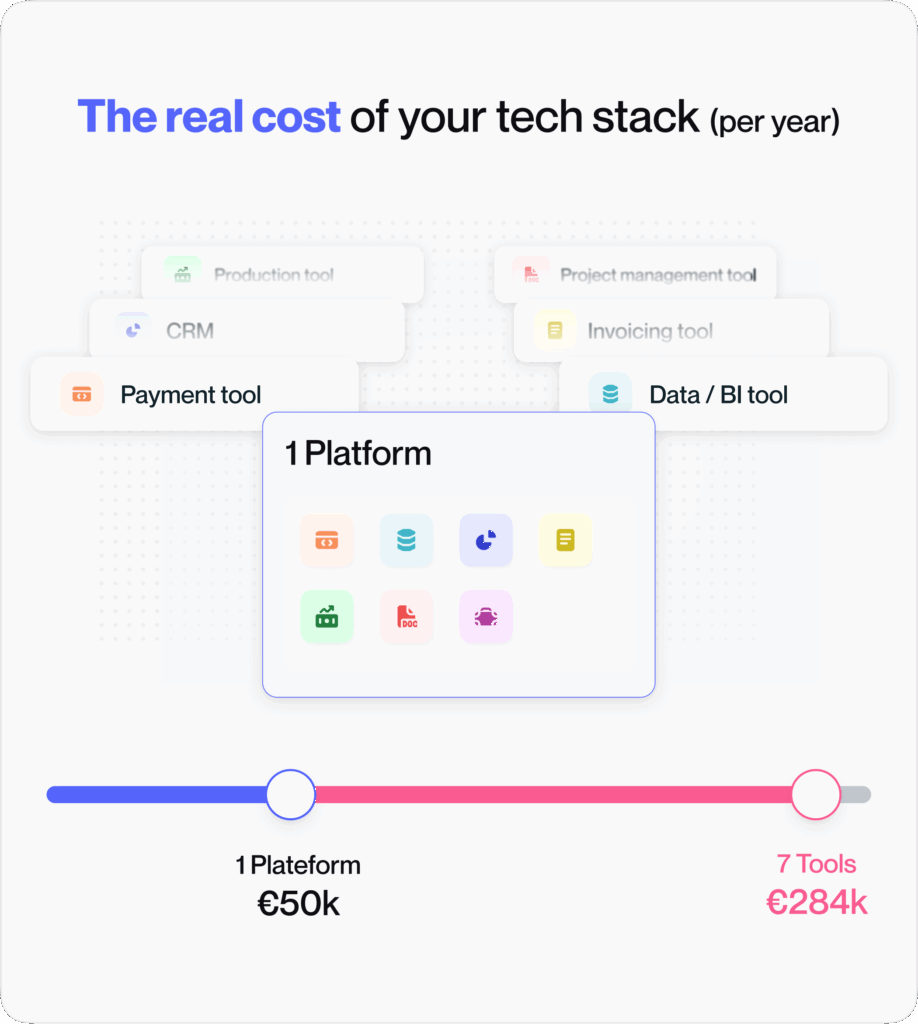
TOTAL COST : €284,000/year
Integrated solution:
- All-in-one platform cost : €50,000/year
- Productivity gain (75% of 154k) : €115,000
- Maintenance savings (70%) : €10,000
- Improved reactivity : opportunities seized
━━━━━━━━━━━━━━━━━━━━━━━━━━━━━━━━━━━━━━━━━━━━
NET SAVINGS : ~€209,000/year
You read that right: for a 20-person agency, the difference can exceed €200,000 per year.
And these figures are conservative. Many agencies discover, by honestly doing the exercise, that their stack costs them even more.
Before Furious, we had several tools managed by department, but it was complex to manage. With Furious, we standardized everything with a dedicated tool for agencies. This has truly been a game changer for internal communication and team productivity.
Harold Gardas, CEO Köm Média
The integrated solution: an ROI calculated in weeks
Faced with this reality, more and more agencies are choosing consolidation. And feedback shows that it’s not just a matter of costs, but of overall performance.
Immediate benefits
From the first month of migrating to an integrated solution, the gains are tangible:
One subscription instead of 7
- A single monthly invoice
- Only one annual renewal to manage
- A single commercial negotiation
- Immediate administrative simplification
One training for the entire team
- Single learning curve
- Centralized documentation
- Rapid skill development
- Accelerated onboarding for new recruits
A single point of contact for support
- No more playing ping-pong between 7 different support teams
- Faster resolution of cross-functional issues
- A true partnership relationship possible
- Single product roadmap to follow
Unified data in real-time
- Consolidated view of your entire activity
- Automatic and always up-to-date dashboards
- Ability to make informed decisions quickly
- Early detection of problems and opportunities
Rapid return on investment
Studies on the ROI of integrated solutions show encouraging results. According to a WPForms analysis (2024), the average ROI of an integrated CRM is achieved in 13 months. And that’s for a simple CRM, not a complete all-in-one solution.
For an all-in-one agency management platform, the typical timeline looks like this:
Months 1-2: Immediate Savings
- Elimination of redundant licenses
- Cancellation of unnecessary subscriptions
- First visible savings by the end of the first month
Months 3-4: Productivity Gains
- Teams master the platform
- Context switching drastically decreases
- First productivity gains become measurable
- Reporting becomes automatic
Month 6: Break-even point
- The investment in migration is amortized
- Processes are optimized
- The learning curve is behind you
Month 12: Solid positive ROI
- All benefits are realized
- Cumulative savings far exceed the initial investment
- Your agency is more agile and competitive
To revisit our example of a 20-person agency saving ~€209,000 per year, the ROI becomes positive as early as the 3rd month if the migration and training investment is €50,000.
Long-term gains that change the game
Beyond simple financial ROI, an integrated solution transforms your way of working:
Simplified scalability
- Adding a new user = one click, not 7 configurations
- Developing a new offering = setting up a workflow, not reinventing the wheel
- Growing from 20 to 50 people without your stack becoming unmanageable
Agility regained
- Unified processes = ability to pivot quickly
- Accelerated response to tenders (all info in one place)
- Launch new services in days, not weeks
Real-time visibility
- Continuous activity monitoring
- Anticipate problems before they become critical
- Rapid identification of growth opportunities
- Decision-making based on fresh and reliable data
Increased competitiveness
- Time and resources freed up to focus on your core business
- Ability to respond faster than your competitors
- Improved customer experience (responsiveness, follow-up, transparency)
- Less fatigued and more engaged teams
Key takeaways
Stacking 7 tools to “choose the best in each category” seems logical on paper. In reality, it’s a strategy that can cost you 3 to 4 times more than the sum of simple subscriptions.
Between phantom licenses, productivity evaporated by context switching, time swallowed by maintenance and integration, and missed opportunities due to lack of visibility, the real cost can easily reach €250,000 to €350,000 per year for a team of 20 people.
The real question is no longer “Can I afford to invest in an integrated solution?” but rather “Can I afford NOT to?“
In a market where every margin point counts, where responsiveness is a decisive competitive advantage, and where team well-being directly impacts performance, continuing to stack tools is like throwing money out the window.
Consolidation is no longer a comfort option. It’s a strategic necessity to remain competitive.
https://blog.furious-squad.com/hubfs/Webinars/%F0%9F%87%AC%F0%9F%87%A7%20Webinars/Webinar%20how%20to%20optimize%20your%20staffing%20with%20furious%20replay%202026-02-03.mp4
Discover Furious
You may be asking
yourself these questions?
01 How many tools does an average agency use?
A medium-sized agency (15-50 people) generally uses between 7 and 15 main tools to manage its operations: CRM, project management, time tracking, invoicing, accounting, collaboration, reporting, etc. In addition, secondary tools and Shadow IT (tools used by employees without official validation) are often added. Studies show that the average company, across all sectors, uses 125 SaaS applications in total.
02 How can I identify unused licenses in my stack?
Several methods exist: request a license usage report from each tool (most SaaS offer this feature), conduct a monthly audit of recent user logins, cross-reference the list of licenses with your current organizational chart to identify departed employees, and directly survey your teams about the tools they actually use daily. You can also use SaaS Management platforms that automate this detection. On average, 51% of provisioned licenses are unused or underused.
03 Isn’t an integrated solution riskier (all your eggs in one basket)?
This is a legitimate concern, but reality shows the opposite. With 7 different tools, you have 7 potential points of failure, 7 security policies to maintain, 7 risks of breaches, and no global overview in case of a problem. A quality integrated platform generally offers enhanced security (only one system to secure, but better), centralized backups, a single clear SLA, and a dedicated support team. Furthermore, modern solutions use robust cloud infrastructures with redundancy. The real risk is having a system so complex that no one truly controls its security.
04 How do I convince my team to abandon their favorite tools?
Change is always a challenge. The key is to start with the daily problems experienced by teams: time lost searching for information in 7 different places, frustrating double entries, the inability to get a comprehensive overview. Involve teams from the beginning of the selection process, let them test the integrated solution beforehand, and show them concretely how their daily lives will be simplified. Also, identify « champions » within each team who can evangelize the solution. And most importantly: support the change with quality training. Resistance drastically decreases when people understand that the new tool will genuinely save them time.
05 What is a realistic timeframe for migrating to an integrated solution?
For an agency of 15-30 people, allow generally 2-3 months for a well-prepared migration: 2-3 weeks for scoping and preparation (process mapping, data cleansing), 3-4 weeks for configuration and data migration, 2-3 weeks for team training and support, then 3-4 weeks for ramp-up with close support. The trick is to proceed gradually: start with a pilot department, validate that everything works, then deploy to the rest of the organization. Some agencies choose a « big bang » migration during a quiet period (August, year-end), while others prefer a more gradual approach over 4-6 months. The essential thing is not to neglect the training phase: it guarantees adoption.
A medium-sized agency (15-50 people) generally uses between 7 and 15 main tools to manage its operations: CRM, project management, time tracking, invoicing, accounting, collaboration, reporting, etc. In addition, secondary tools and Shadow IT (tools used by employees without official validation) are often added. Studies show that the average company, across all sectors, uses 125 SaaS applications in total.
Several methods exist: request a license usage report from each tool (most SaaS offer this feature), conduct a monthly audit of recent user logins, cross-reference the list of licenses with your current organizational chart to identify departed employees, and directly survey your teams about the tools they actually use daily. You can also use SaaS Management platforms that automate this detection. On average, 51% of provisioned licenses are unused or underused.
This is a legitimate concern, but reality shows the opposite. With 7 different tools, you have 7 potential points of failure, 7 security policies to maintain, 7 risks of breaches, and no global overview in case of a problem. A quality integrated platform generally offers enhanced security (only one system to secure, but better), centralized backups, a single clear SLA, and a dedicated support team. Furthermore, modern solutions use robust cloud infrastructures with redundancy. The real risk is having a system so complex that no one truly controls its security.
Change is always a challenge. The key is to start with the daily problems experienced by teams: time lost searching for information in 7 different places, frustrating double entries, the inability to get a comprehensive overview. Involve teams from the beginning of the selection process, let them test the integrated solution beforehand, and show them concretely how their daily lives will be simplified. Also, identify “champions” within each team who can evangelize the solution. And most importantly: support the change with quality training. Resistance drastically decreases when people understand that the new tool will genuinely save them time.
For an agency of 15-30 people, allow generally 2-3 months for a well-prepared migration: 2-3 weeks for scoping and preparation (process mapping, data cleansing), 3-4 weeks for configuration and data migration, 2-3 weeks for team training and support, then 3-4 weeks for ramp-up with close support. The trick is to proceed gradually: start with a pilot department, validate that everything works, then deploy to the rest of the organization. Some agencies choose a “big bang” migration during a quiet period (August, year-end), while others prefer a more gradual approach over 4-6 months. The essential thing is not to neglect the training phase: it guarantees adoption.